Contents
- Introduction
- Understanding CDN Fundamentals for WordPress
- How to Choose the Right CDN for WordPress
- Top 20 CDNs for WordPress in 2026: Summary Table
- In-Depth Profiles of the Top 20 Picks
- Pricing Structures Explained
- WordPress-Specific Features and Plugin Integrations
- Security and Performance Enhancements via CDNs
- Making the Final Decision
- Conclusion
Your WordPress site is only as good as its speed, reliability, and resilience. For marketing agency owners and developers, that means one thing: if your website isn’t fast or secure, you’re bleeding conversions and clients. That’s where Content Delivery Networks (CDNs) come in.
A modern CDN does way more than deliver static files faster. It boosts your website’s performance globally, protects against attacks, and shaves critical seconds off your load times. And in 2026, those seconds make or break bounce rates more than ever.
CDNs work by distributing your WordPress site’s content—like images, scripts, and pages—to strategically located servers worldwide. When someone visits your site, the CDN serves assets from the location closest to the visitor. Faster delivery. Less strain on your hosting server. Better experience across the board.
Why WordPress Sites Need a CDN in 2026
If you’re running (or managing) a WordPress site, here’s what you’re dealing with:
- Speed expectations are off the charts. Users expect snappy websites, even on mobile and across borders. Google rewards that with higher SEO rankings.
- Page builders and WooCommerce can bulk up your site. While these tools offer flexibility, they often load dozens of resources per page. A CDN helps unburden your server.
- DDoS attacks and bot traffic haven’t gone away. Web security is a real cost now, not an optional extra—and WordPress sites remain frequent targets.
- Image-heavy and media-rich content keeps growing. From hero banners to client portfolios, CDNs help compress and deliver media at optimal quality without slowdown.
So whether you manage five small business sites or an enterprise ecommerce ecosystem, the need for scalable, secure delivery is the same. A quality CDN makes sure your clients (and their customers) experience lightning-fast load times, wherever they are.
The Problem: Picking the Right CDN Can be Overwhelming
The market is stacked with options. Some are free. Some charge per GB. Some bundle with security, while others deliver pure performance. The overlap is confusing, and pricing models can seem intentionally opaque.
If you’re managing sites for clients, you can’t afford trial and error. Each missed second, each breach, each cache miss has reputational risk tied directly to your agency or freelance work.
This Guide Fixes That
This isn’t just another “listicle.” It’s an expert-curated breakdown designed for real-world agency workflows and developer budgets.
- We’ll cover 20 of the top CDN services for WordPress in 2026.
- You’ll see exactly what each provider offers—performance perks, pricing model, WordPress compatibility, and more.
- Each CDN is scored with real pros, cons, and warnings (🟢 🟡 🔴) so you can compare fast and make decisions with confidence.
If your work involves:
- Launching high-speed sites for revenue-focused clients
- Managing WooCommerce stores with international buyers
- Tuning Core Web Vitals for better SEO
- Offloading media and static assets from underpowered hosts
Then this guide is built to save you hours of research and lost leads.
Suspicious of your current WordPress hosting too? You might also check out the HyperPress platform from GillyTech, built for agency-scale WordPress performance.
This is the year you stop guessing and start scaling. Let’s find your CDN match.
Understanding CDN Fundamentals for WordPress Sites
You don’t need to be a network architect to understand how different CDNs works with WordPress—but you do need to grasp the basics if you’re running client sites or optimizing performance at scale.
Let’s break down what a CDN really is and how it interacts with WordPress behind the scenes.
What a CDN Actually Does for WordPress
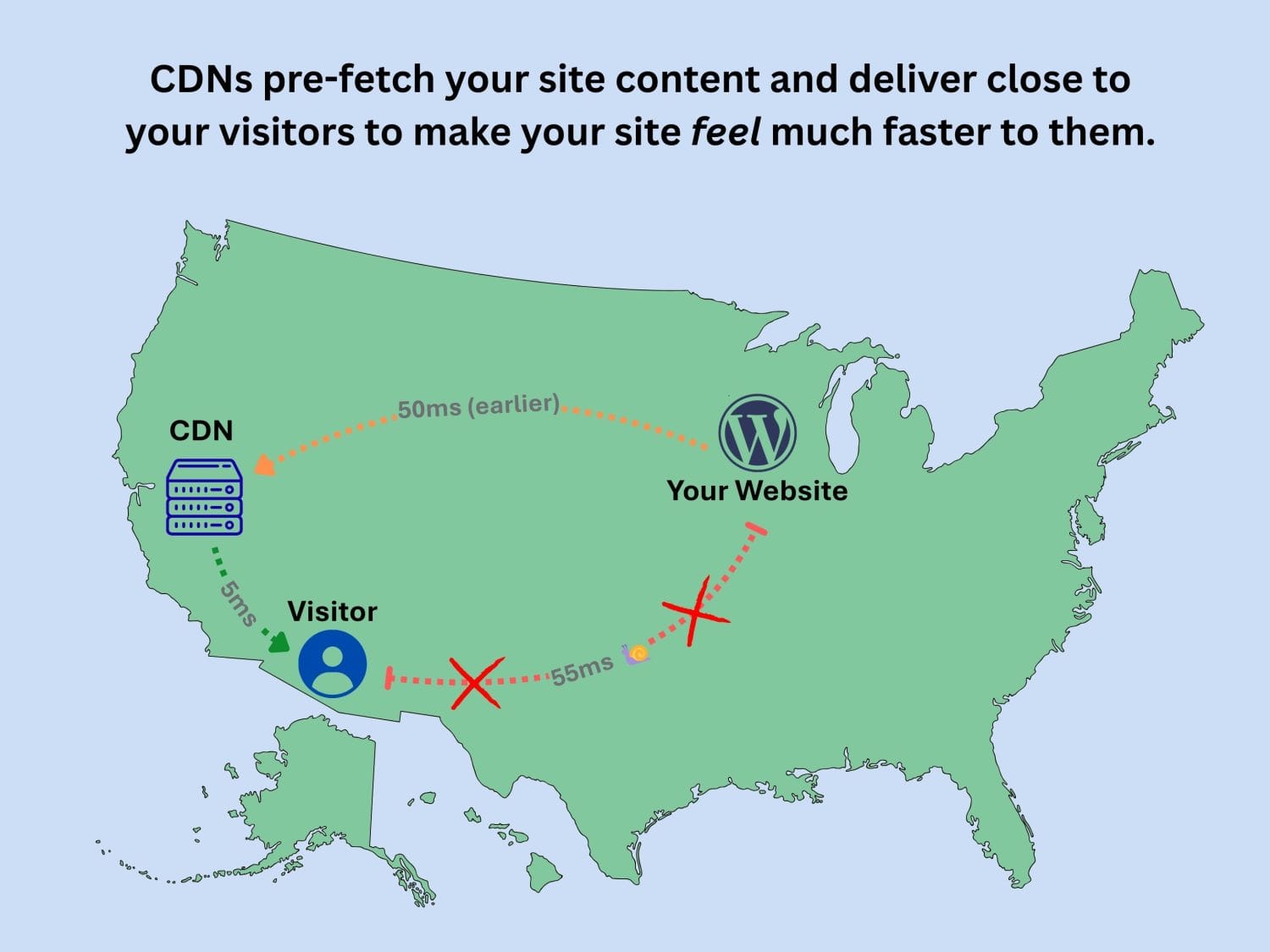
A Content Delivery Network (CDN) stores and distributes your WordPress site’s assets (like images, CSS, and JS files) across a global network of servers. These are fine-tuned edge locations built to respond faster than your origin host (wherever your WordPress server is located), especially for visitors farther from your main data center.
So when someone on the other side of the country—or the globe—loads your site, their browser fetches images, scripts, and even cached HTML from a location close to them. That slashes latency, drops server requests, and smooths the user experience.
But a CDN’s benefits go deeper than just speed.
- It absorbs traffic spikes when your content goes viral or gets slammed with bots.
- It reduces origin-load on your primary hosting, making even modest shared hosting more viable for WP sites, saving you on hosting costs.
- It improves uptime by insulating visitors from origin server hiccups.
WordPress-Specific CDN Integration
WordPress is dynamic, flexible, and—let’s be honest—a bit heavy. You’re dealing with database-driven content, dynamic page builders, layered plugin assets, and large media galleries. That means not all CDNs are equal in how well they help lighten the load.
When choosing or evaluating a CDN, here are the features that matter most to WordPress site owners and developers:
💾 Caching Compatibility
WordPress doesn’t serve full, premade HTML pages by default; those are generated on every user request. So, smart caching is everything. CDNs with specific WordPress cache strategies can store and serve pre-generated pages closer to the visitor, without breaking login states or dynamic WooCommerce carts.
Look for:
- Edge caching for full-page HTML (like QUIC.cloud’s dynamic cache or Cloudflare’s APO)
- Bypass logic for admin users and logged-in sessions
- Cache purging support when content is updated
CDNs that play nicely with your cache plugin (WP Rocket, W3 Total Cache, LiteSpeed Cache, etc.) mean fewer misfires and fewer support tickets from clients seeing outdated content.
🏞️ Image Optimization
Most WordPress sites are slow because of bloated images. A smart CDN can take on that job by resizing, converting to WebP or AVIF, and compressing before images hit your user’s screen.
- On-the-fly resizing based on screen size or layout breakpoints
- Lossless or adaptive compression tailored for speed without killing quality
- Lazy loading support that helps delay non-critical images until needed
Providers like BunnyCDN and Optimole bake these features into their service, but other CDNs can pair well with image-focused plugins if you prefer modular setups.
⚡ HTTP/3 Support
Speed isn’t just about fewer miles—it’s about better roadways. HTTP/3 is the latest iteration of how data travels from your website to your visitor’s browser. Built on UDP, it offers faster startup times and better performance on unpredictable mobile connections.
CDNs that are HTTP/3-ready give your WordPress sites a strategic edge—especially on mobile-first or international campaigns. It’s a built-in layer of client satisfaction you don’t need to code yourself.
⛓ Built-in Security: WAFs and DDoS Protection
Security is no longer an “add-on.” If you’re serving sites for clients, it’s non-negotiable. CDNs act as a frontline defense with:
- Web Application Firewalls (WAFs) that filter malicious requests and known exploits
- DDoS mitigation to keep bots and attack floods from bringing down your site
- Bot detection and rate limiting that thwarts brute force and credential stuffing
Many CDNs also help automate secure headers (like CSP and HSTS) and TLS management, giving agency teams peace of mind on compliance without needing a DevSecOps budget.
🔌 WordPress Plugin Ecosystem Compatibility
Whether you’re running a WooCommerce store, showcasing a media gallery, or running a high-traffic blog, the easiest setup is the one that works with what you already use.
The best CDNs for WordPress offer integrations via plugin or direct compatibility with leading performance stacks.
- Cloudflare: Works seamlessly with their APO plugin and major firewall rulesets
- QUIC.cloud: Built for LiteSpeed Web Server users, with edge cache and full-page purging
- Amazon CloudFront + WP Offload Media: Ideal for media handling on AWS-based stacks
- Jetpack: For simple image and video acceleration directly from the WP admin
If you’re weighing plugin-based setups versus DIY configurations, choose a CDN that won’t fight your existing plugin ecosystem. Less tuning. Less support headache.
Need help aligning CDN setup with your WordPress plugin stack? The GillyTech blog covers WordPress-specific workflows agency teams actually use in production.
Understanding the Trade-Offs
CDNs bring huge value, but they’re not always plug-and-play. In some cases, an overly aggressive cache config can serve outdated content. Image optimization might conflict with what your theme already handles. Security layers might block admin actions if not configured right.
This is why smart integration beats raw firepower. You want a CDN that’s aware of WordPress, communicates well with your existing stack, and gives you control when you need to fine-tune.
When you match the right CDN to the right feature set for your WordPress site, you don’t just speed things up—you stabilize and scale them for the long haul.
If you’re looking for a performance-first hosting partner designed for WordPress at agency scale, check out HyperPress by GillyTech. It’s engineered with CDN integration in mind, right from the first click.
How to Choose the Right CDN for Your WordPress Website
Picking a CDN for a WordPress site shouldn’t feel like solving a riddle with hidden fees and vague feature lists. But that’s exactly what most agency owners and developers run into. If you want predictable performance and clean client handoffs, your CDN needs to check the right boxes for speed, security, and usability—without draining your cost-per-site margins.
Here’s how to evaluate CDN providers with confidence and skip the guesswork.
Begin With the Budget
CDN pricing structures vary widely. Some charge by bandwidth (per GB), others offer flat monthly plans, and a few bundle CDN with WordPress hosting. Know your limits going in, and match the pricing model to the project:
- Per GB pricing: Ideal for smaller or seasonal sites with low-to-moderate usage (e.g. BunnyCDN, KeyCDN).
- Monthly flat-rate CDN: Helps keep costs predictable for higher-traffic or client-facing plans (e.g. RocketCDN, Cloudflare Pro).
- Built-in CDN with managed hosting: Efficient for agencies using streamlined hosting stacks (e.g. Hostinger CDN, SiteGround).
Tip: Keep a shared spreadsheet of past projects’ bandwidth stats. You’ll start seeing patterns you can use to forecast future monthly cost ranges and spot overpriced tiers.
Check the Global Reach
The more Points of Presence (PoPs), the better. This boosts speed for international visitors and removes geographic bottlenecks for WooCommerce stores or multi-region campaigns.
If a provider has only 20-40 PoPs, it may work fine for purely US traffic. But if your client services customers across Europe or Asia, look for CDNs with 100+ global nodes (like Cloudflare or Amazon CloudFront).
Prioritize WordPress Integration
Make no mistake: some CDNs were built with WordPress in mind, others were bolted on after the fact. You want tight compatibility from the start. That means:
- Official WordPress plugins or integrations exist and are maintained (e.g. QUIC.cloud with LiteSpeed Cache, Cloudflare with APO).
- Frictionless setup with cache plugins you already use (like WP Rocket, W3 Total Cache, or WP Super Cache).
- Cache purging, full-page caching, and cookie-aware rules are supported.
Avoid CDNs that leave you copy-pasting headers or setting cache-control rules manually. That’s time your agency doesn’t bill for.
Support for Media-Heavy Sites
Large images, embedded video, product carousels—every client wants “engaging visual content” but no one wants the speed hit. Your CDN must address this head-on with features like:
- On-the-fly image optimization (resize and compress at the edge)
- Next-gen formats like AVIF or WebP supported natively
- Lazy loading or delayed assets based on viewport
Working with photographers, designers, or video-first brands? Favor BunnyCDN, Optimole, or Envira CDN—they’re already geared for that workload.
Match Your Security Requirements
If your client ever got hacked, you already know this: a CDN without WAF or bot protection is a liability. Choose CDNs that bake in or offer:
- Web Application Firewall (WAF) that blocks SQL injections, XSS, and other known vulnerabilities
- DDoS mitigation layers that can auto-scale during attacks
- IP allowlists, rate-limiting, and geo-blocking options for granular control
Security-forward options include Sucuri, Cloudflare, and StackPath. For ecommerce or large-scale sites, these features are table stakes, not nice-to-haves. Want more on this? Browse our WordPress security guide for 2026.
Scalability for Growth
WooCommerce stores and content-heavy brands don’t just need speed—they need consistency under load. High cart abandonment rates often point back to lag at key buyer interactions. Ask yourself:
- Does this CDN allow edge-caching for dynamic pages?
- Is session handling (like cart data) respected?
- Can you access usage data or configure rules hourly?
CDNs like Cloudflare with APO, QUIC.cloud with dynamic cache, and Amazon CloudFront (paired with WP Offload Media) scale smoothly with traffic surges and seasonal load peaks.
If your agency handles WooCommerce at scale, review the provider’s documentation around cache exceptions, login sessions, and compatibility with checkout plugins.
Don’t Overlook Support and Documentation
If something goes wrong, how fast can you resolve it? Look for:
- Live chat or email support with decent response times
- Internal guides/tutorials for setup and troubleshooting
- Community presence (forums, plugin reviews, roadmap transparency)
There’s a difference between being affordable and being abandoned. Cheap CDNs with zero support teams waste more time than they save.
The Right Match Looks Like This
Use this quick checklist when matching CDNs to your next WordPress project:
- Budget model aligns with project type (per GB, flat fee, or bundled)
- Geo-reach fits audience scope (local vs international)
- WordPress plugins supported and actively maintained
- Media features optimized for your content type
- Security tools included (and easy to configure)
- Client performance grows without growing cost unpredictably
Want tailored guidance for your stack? See our thoughts on how to evaluate hosting + CDN combos optimized for scale and speed.
Don’t guess. Compare smart. The right CDN delivers far beyond page speed—it supports your entire delivery pipeline.
2026’s Top 20 CDNs for WordPress: Comprehensive Comparison
Ready to compare fast and pick the right CDN? This table summarizes the top 20 WordPress-ready CDN providers for 2026—ranked by WordPress relevance, usability, speed perks, and WordPress integration strength. Use it to get a high-level snapshot, then click any provider name to jump to its in-depth profile below.
| Rank | Provider | Key Strengths for WordPress | Free Tier? | Pricing Starts At | Points of Presence (PoPs) |
|---|---|---|---|---|---|
| 🥇 | QUIC.cloud | LiteSpeed Cache integration, full-page HTML & DB edge caching, HTTP/3 native | Yes | $0.02/GB+ | 80+ |
| 🥈 | BunnyCDN | Ultra-low latency, image optimizer add-on, WP plugin for pull zones | Trial | $0.01/GB | 100+ |
| 🥉 | Amazon CloudFront | 600+ PoPs, WP Offload Media integration, scalable WooCommerce support | Yes | $15/mo | 600+ |
| 4 | Cloudflare | Dynamic caching via APO, strong security, seamless WordPress flow | Yes | $20/mo Pro | 300+ |
| 5 | KeyCDN | Origin Shield, image resizing, Cache Enabler plugin support | Trial | $0.04/GB | 50+ |
| 6 | Imperva CDN | Advanced WAF, real-time routing, global optimization | No | Custom | 70+ |
| 7 | RocketCDN | Unlimited bandwidth, WP Rocket integration, easy setup | No | $8.99/mo | 90+ |
| 8 | Google Cloud CDN | HTTP/3 support, strong with analytics-focused WP stacks | Trial | $0.08/GB | 100+ |
| 9 | CDN77 | Brotli compression, video streaming, plugin-flexible | Trial | $0.045/GB | 40+ |
| 10 | Sucuri | WAF + CDN combo, malware scans, SEO-focused speed | No | $199/yr | 20+ |
| 11 | Akamai | Custom WP configs, edge compute, high-traffic support | No | Custom | 4,000+ |
| 12 | Fastly | Real-time edge scripting (VCL), developer flexibility | Yes | $0.12/GB | 100+ |
| 13 | Gcore | Affordable PoP reach, video optimizations, WP-friendly | Trial | $0.015/GB | 140+ |
| 14 | Hostinger CDN | Easy install with Hostinger plans, WP starter-friendly | With hosting | Free Add-On | 200+ |
| 15 | SiteGround CDN | Multi-region tuning, WP-first hosting environment | With hosting | Free Add-On | 40+ |
| 16 | Jetpack | Zero-config image/video CDN, native WordPress bundling | Yes | $10/mo premium | 50+ |
| 17 | BelugaCDN | Simplified dashboard, small-site friendly, low-cost rates | Trial | $0.005/GB | 70+ |
| 18 | Envira CDN | Optimized for WordPress galleries, bundled image tools | No | $29/yr | 100+ |
| 19 | Optimole | AI image compression, 80% file size cuts, WP media syncing | Yes | $9.99/mo | 100+ |
| 20 | Infinite Uploads | Handles large media offloads, no-fuss WP integration | Trial | $5/mo | 50+ |
💡 Tip: If you’re interested in pairing the right CDN with purpose-built hosting strategies, don’t miss our guide on trusted WordPress hosting combos for 2026. It’ll help you connect performance choices with real savings.
This table is your reference point as you scroll through each detailed profile. If you’re running client sites with different specs and traffic patterns, the flexibility to compare across workload types will save you both money and support tickets.
You’re only one click away from finding the CDN built for your agency or freelance stack.
In-Depth Profiles of the 20 Best CDNs for WordPress
Each CDN below has been evaluated through the lens of WordPress optimization, ease of plugin integration, performance consistency, and security relevance for agencies and developers managing client sites across the US and internationally.
1. QUIC.cloud
Why it ranks #1: Full-page edge caching with built-in database acceleration tailored for LiteSpeed-based WordPress sites. Relatively straightforward to get set up even for a newcomer to the space.
- 🟢 Pros: Tight LiteSpeed Cache integration, HTTP/3 and QUIC protocol support, edge + dynamic caching, and easy to get started
- 🟡 Cons: Requires LiteSpeed server setup to unlock full features
- Pricing: $5/month (limited free tier available with more generous limits for LiteSpeed Enterprise users)
- PoPs: 80+
2. BunnyCDN
Why it ranks #2: Exceptionally low-latency delivery infrastructure perfect for image-heavy or video-rich WordPress sites. Easier to use than some of the bigger platforms while maintaining performance.
- 🟢 Pros: $0.01/GB pricing, image optimization add-on, WordPress pull zone plugin
- 🟡 Cons: UI requires a learning curve for non-developers
- Pricing: Starts at $0.01/GB (free trial available)
- PoPs: 100+
3. Amazon CloudFront
Why it ranks #3: Enterprise-grade scale within AWS infrastructure and seamless WP Offload Media compatibility.
- 🟢 Pros: 600+ PoPs worldwide, highly scalable, integrates well with WP media plugins
- 🟡 Cons: Complex configuration, higher cost flat rate for low traffic sites
- Pricing: Starts at $15/mo (first year free via AWS Free Tier)
- PoPs: 600+
4. Cloudflare
Why it ranks #4: The APO plugin transforms WordPress performance with intelligent dynamic content caching. The service has been considered #1 among techies and developers but has seen some instability of late.
- 🟢 Pros: Free tier available, robust security tools, APO plugin optimizes WordPress pages
- 🟡 Cons: APO not included in free plan, requires DNS usage with Cloudflare, downtime
- Pricing: $20/month (Pro Plan)
- PoPs: 300+
5. KeyCDN
Why it ranks #5: Great balance of affordability and speed, plus official support for WordPress caching plugins. Easy to get set up.
- 🟢 Pros: Cache Enabler plugin support, image resizing at edge, Origin Shield support
- 🟡 Cons: Limited WAF and advanced security features
- Pricing: $0.04/GB (free trial available)
- PoPs: 50+
6. Imperva CDN
Why it ranks #6: Strong on security with granular control over edge routing and performance rules.
- 🟢 Pros: Enterprise-grade WAF, developer-grade configurability
- 🔴 Cons: No free tier, pricing not transparent
- Pricing: Custom (no public base rate)
- PoPs: 70+
7. RocketCDN
Why it ranks #7: Turnkey setup bundled with the popular WPRocket plugin, ideal for fast launches and non-technical clients.
- 🟢 Pros: Unlimited bandwidth, built specifically for WordPress users of WP Rocket
- 🟡 Cons: No advanced control for devs needing custom edge handling
- Pricing: $8.99/month/domain (no free tier)
- PoPs: 90+
8. Google Cloud CDN
Why it ranks #8: Google’s own network backbone and HTTP/3 support deliver consistent performance for analytics-heavy sites. Recent downtime also knocked this down a few positions on the list.
- 🟢 Pros: Direct GCP integration, strong for mobile-first site delivery
- 🟡 Cons: Requires some GCP console fluency (complicated UI), recent downtime.
- Pricing: $0.08/GB (with trial credit)
- PoPs: 100+
9. CDN77
Why it ranks #9: Great Brotli compression and video streaming performance with WordPress plugin flexibility.
- 🟢 Pros: Brotli enabled, flexible integration, excels with video delivery, long term stability
- 🟡 Cons: Smaller presence in Asia
- Pricing: $0.045/GB (free trial available)
- PoPs: 40+
10. Sucuri
Why it ranks #10: Strong security-first CDN that also boosts SEO through speed optimization.
- 🟢 Pros: Built-in firewall, malware detection, performance + security benefit in one
- 🟡 Cons: Low PoP count, annual billing only
- Pricing: $229/year
- PoPs: 20+
11. Akamai
Why it ranks #11: Unmatched global network with support for custom WordPress enterprise builds.
- 🟢 Pros: 4,000+ PoPs, edge compute capabilities, top-tier for scale
- 🔴 Cons: Overkill (and over-budget) for most SMB projects
- Pricing: Custom only
- PoPs: 4,000+ (🔥🔥🔥)
12. Fastly
Why it ranks #12: For developers who want command-line control and edge scripting via VCL.
- 🟢 Pros: Instant cache purge, custom rules, VCL scripting supported
- 🟡 Cons: Not beginner-friendly, expensive per GB
- Pricing: $0.12/GB (free tier available)
- PoPs: 100+
13. Gcore
Why it ranks #13: Affordable with wide-reaching PoPs and good media handling support. Offers a WordPress-specific CDN product. Also started offering HTTP/3 support (tech preview)
- 🟢 Pros: 140+ global PoPs, next-gen image support, low bandwidth costs, WordPress plugin.
- 🟡 Cons: Less reputable than other providers, poor support response.
- Pricing: $0.015/GB (trial available)
- PoPs: 140+
14. Hostinger CDN
Why it ranks #14: Ideal for small businesses and agencies already hosting on Hostinger.
- 🟢 Pros: 200+ PoPs, free with Hostinger plans, simple WP setup
- 🟡 Cons: Bundled with hosting, not usable as standalone CDN
- Pricing: Free add-on (with Hosting)
- PoPs: 200+
15. SiteGround CDN
Why it ranks #15: WordPress-native environment with CDN tuning built for their hosting customers.
- 🟢 Pros: 20% page speed boost for WP, easy panel controls
- 🟡 Cons: Locked to SiteGround ecosystem
- Pricing: Free add-on (with Hosting)
- PoPs: 40+
16. Jetpack
Why it ranks #16: Simple, no-fuss media CDN that just works for blogs, portfolios, and small clients; entry level.
- 🟢 Pros: Free image + video delivery, native WP integration
- 🟡 Cons: Not a full CDN—no page caching or WAF
- Pricing: $10/month (premium tier)
- PoPs: 50+
17. BelugaCDN
Why it ranks #17: Low-cost WordPress CDN offering simple delivery and US-first speed.
- 🟢 Pros: $0.005/GB, easy dashboard, developer-friendly setup
- 🟡 Cons: Fewer advanced features compared to newcomers
- Pricing: $0.005/GB (trial available)
- PoPs: 70+
18. Envira CDN
Why it ranks #18: Purpose-built for WordPress galleries and portfolio-heavy websites. Relative newcomer to the space.
- 🟢 Pros: Bundled with Envira WP plugin, image-focused optimization
- 🟡 Cons: Not general-purpose; cleanest use-case is visual galleries
- Pricing: $50/year (no free tier)
- PoPs: 335+
19. Optimole
Why it ranks #19: AI-powered image tools blend well with large WP media libraries.
- 🟢 Pros: Up to 80% size reduction, AVIF/WebP support, WP plugin integration
- 🟡 Cons: Focused only on images/media—doesn’t replace full CDN stack
- Pricing: $9.99/month (free tier available)
- PoPs: 100+
20. Infinite Uploads
Why it ranks #20: Handles large file offloading and streaming inside the WordPress dashboard.
- 🟢 Pros: WP-focused UI, simple setup, good for podcast or video libraries
- 🟡 Cons: Storage-focused, not a traditional edge CDN
- Pricing: $5/month (trial available)
- PoPs: 50+
If you’re not sure which of these fits with your current hosting setup or performance needs, take a quick scan through our guide on how agencies optimize WordPress for speed. It’ll help you stack these CDNs against real workload expectations.
One right CDN fit can dramatically reduce bounce, improve conversions, and make you look like a hero to your clients. Not to mention save a ton of money by reducing duplicative functions across services.
Pricing Structures Explained: What Marketing Agencies and Developers Should Know
CDN pricing isn’t just about a number on a page—it’s about interpreting cost relative to performance, client workload, and stability. Knowing what you’re paying for (and what you’re risking by trying to save a buck) is key when building scalable WordPress projects for paying clients.
How CDN Pricing Models Work
Most CDNs follow one of three billing formats. Each affects how you scope client projects, budget for bandwidth-heavy sites, and map out your monthly or annual expenses.
- 🧮 Pay-per-GB (Usage-Based): You pay for the amount of data transferred, typically ranging from $0.005/GB to $0.12/GB depending on provider and region. Great for developers managing many smaller sites with predictable, low traffic. Examples: BunnyCDN, KeyCDN, BelugaCDN.
- 📅 Flat Monthly Rate: A fixed monthly charge, sometimes including unlimited bandwidth or high data thresholds. Ideal for agencies with high-traffic clients or retainer-based billing. Examples: QUIC.cloud ($5/mo), Cloudflare Pro ($20/mo), RocketCDN ($8.99/mo).
- 📦 Bundled with Hosting: Some hosting platforms offer a CDN as part of their package. These are efficient for agencies standardizing on shared stacks. Examples: SiteGround CDN, Hostinger CDN.
Some CDNs (like Amazon CloudFront or Fastly) offer a free usage tier or trial credit to test drive their ecosystem. But be cautious: once you exit the free zone, billing can spike fast without alerts.
The Traffic Spike Effect
Client launches a sale. Website goes viral. Adsense ads explode. All your profit just went to CDN overages.
If you’re on a per-GB pricing plan, even minor surges in traffic can drastically inflate costs. For example, serving HD images to 40,000 international visitors in a week could lead to unexpected multi-hundred-dollar charges—especially on higher tier CDNs like CloudFront or Fastly.
To blunt that risk:
- 🟢 Choose a CDN with bandwidth alerts or automatic throttling
- 🟢 Pre-size and optimize images before they hit the CDN (use compression plus lazy loading)
- 🟡 Avoid rerouting unnecessary admin or login requests through the CDN
- 🟢 Use cache rules that sidestep dynamic pages where possible
Predictability is everything when managing WordPress at scale. Don’t let fees snowball from forgotten media galleries or theme videos left uncached.
Cost Efficiency Across Providers
On paper, $0.01/GB (BunnyCDN) seems unbeatable… and for many projects, it is. But value doesn’t just come from bandwidth fees—it comes from support, edge reach, WordPress-specific tools, and time saved troubleshooting.
Here’s how to weigh cost against benefit:
- High-volume, cost-sensitive sites: Go with usage-based CDNs like Gcore, BunnyCDN, or BelugaCDN. Pair them with a solid cache strategy to limit waste.
- Small sites with visual portfolios: Check out Jetpack (free), Infinite Uploads, or Optimole, which includes image compression in monthly pricing.
- Complex or security-sensitive builds: Flat monthly CDNs like QUIC.cloud or RocketCDN reduce surprises while delivering consistent performance.
Bundling and Multi-Site Discounts
If you’re managing multiple client sites, you may be overpaying without realizing it. Some CDNs offer account-wide pooling of bandwidth or multi-zone billing (like QUIC.cloud), while others reward large usage volumes with step-down pricing after certain GB thresholds. Read that fine print if you’re juggling 10+ installs under one umbrella.
And if you’re using hosting-CDN bundles like SiteGround or Hostinger, triple-check the fair usage caps. “Unlimited” can sometimes mean “We’ll throttle you when we feel like it.”
Tips to Keep CDN Costs Under Control
- Estimate average monthly usage per site before choosing a provider—use past traffic logs or performance plugins for baseline predictions.
- Compress and lazy-load all media. The less your CDN serves, the cheaper your bill stays. Add AVIF/WebP conversion when available.
- Avoid double-CDN-ing. Don’t mix Jetpack’s media delivery with Cloudflare page caching with WP Rocket’s CDN unless scoped properly.
- Set cache rules correctly. Uncached assets (like admin pages or feeds) cost dollars over time. Cache-bypass misfires can inflate total GB used.
- Audit usage monthly, not quarterly. Watch for surprises like WooCommerce search filters or new blog subscribers causing dynamic traffic.
For agency-standard setups, it helps to schedule quarterly pricing audits across your stacks. We recommend assigning a “CDN billing lead” in your internal process, especially if you’re balancing multiple client subaccounts or splitting costs at the invoice level.
When to Pay More (On Purpose)
It seems tempting to only chase the lowest per-GB provider. But in real life, $9/month spent on clean integration and edge-cached dynamic pages may save you hundreds in long-term bounce rates and dev hours.
So pay more when:
- You need strong WAF and DDoS protection included (e.g. Sucuri, Cloudflare)
- The site handles transactions or logged-in personalization (e.g. WooCommerce, LMS platforms)
- Your team needs support, training docs, or plugin-based integration for smooth delivery
You can always reduce risk by starting on a trial or free tier. Just remember—some CDNs scale fees faster than others.
If you’re juggling monthly invoices from multiple stacks right now, you may benefit from a custom audit. The team at GillyTech helps agencies simplify hosting + CDN strategy for max ROI without burning hours on guesswork.
Every dollar you control frees up margin for growth. Choose smart, get transparent, and stop overpaying for performance you didn’t ask for.
WordPress-Specific Features and Plugin Integrations
Choosing a CDN that “works” for WordPress isn’t enough. You want one that actually understands WordPress. That distinction becomes critical when you’re dealing with client sites, WooCommerce storefronts, media-heavy blogs, or multisite networks. The difference between hours of debugging and a five-minute config often comes down to plugin-level compatibility.
Here’s a breakdown of the top CDNs that go the extra mile for WordPress users—and how their integrations stack up in real-world use.
QUIC.cloud + LiteSpeed Cache
QUIC.cloud was built from the ground up for LiteSpeed Cache, and it shows.
- 🟢 Tight integration with the LiteSpeed Cache plugin: Dynamic page caching, database query caching, and intelligent purging all work right from your WordPress admin. You don’t need to write a single rule manually.
- 🟢 Edge deliverability: HTML pages, WooCommerce carts, and even logged-in sessions can be selectively cached or bypassed as needed.
- 🟡 Server requirement: You’ll need a LiteSpeed-based server to tap into all features.
If you’re using a hosting provider like Hostinger or NameHero with LiteSpeed built in, this combo is arguably the most performance-efficient setup short of custom-built edge compute.
Amazon CloudFront + WP Offload Media
Amazon CloudFront is enterprise-grade, but it’s not turnkey without help. That’s where WP Offload Media comes into play.
- 🟢 Easy media offloading: Automatically uploads your WordPress media library to S3 and serves it through CloudFront. Speeds up delivery while reducing load on your origin server.
- 🟡 Complexity: Setting this up requires some AWS knowledge (IAM permissions, S3 buckets, CloudFront distribution config). You’ll want to follow a tested setup process.
This stack is worth considering for developers building with AWS-native services or clients already invested in the Amazon ecosystem.
Cloudflare + Automatic Platform Optimization (APO)
Cloudflare’s APO plugin is one of the few truly game-ready options for WordPress dynamic content caching.
- 🟢 Serves entire WordPress pages from Cloudflare’s edge: Not just static assets. Includes intelligent cache purging, cookie-aware logic, and support for login/session toggle.
- 🟢 Smooth plugin interface: Activate the plugin, toggle APO, and you’re set. No coding or config needed.
- 🟡 Not free: APO is only available on paid plans (starting at $20/month) and requires Cloudflare DNS.
For sites that change frequently or run WooCommerce, the APO plugin paired with Cloudflare rulesets creates a very stable and scalable environment. You can explore alternative approaches if Cloudflare DNS isn’t in the cards for your setup.
RocketCDN + WP Rocket
This duo is made for speed and simplicity. RocketCDN is bundled with WP Rocket, one of the top caching solutions on the market for WordPress.
- 🟢 One-click integration: Your WP Rocket dashboard connects directly to RocketCDN. No manual zone creation. No additional plugin bloat.
- 🟢 Unlimited bandwidth: Predictable costs for high-traffic sites matter. RocketCDN’s pricing leaves room in your margins.
- 🟡 Limited edge customizations: Advanced devs may find fewer global caching rule options versus other CDNs.
This stack is ideal for agencies that want reliable performance with minimal backend headaches. Need a faster site launch path? Our guide on picking WordPress tools for speed can help align tools and tech goals.
KeyCDN + Cache Enabler
KeyCDN doesn’t come with all the bells and whistles, but what it does offer is rock-solid cache performance, especially when paired with Cache Enabler.
- 🟢 Simple static caching that’s ideal for blogs, portfolios, or SMB sites that don’t require full dynamic content rules
- 🔧 Compatible with other cache plugins if you outgrow Cache Enabler
- 🟡 No advanced WooCommerce or session-aware rules: Best for non-transactional content sites
If you’re building brochure sites under tight budgets, this is a low-friction combo that still delivers measurable speed benefits.
Jetpack’s Native CDN
Jetpack is the go-to CDN for teams that just want WordPress to “load faster” without touching other infrastructure.
- 🟢 Image and video CDN built directly into the Jetpack plugin. No DNS changes, no CDN panel logins. Activated with a toggle.
- 🟡 Doesn’t serve HTML or JS/CSS files at the edge: It’s not a full CDN like Cloudflare or QUIC.cloud. But for non-technical users? It’s solid.
Perfect for non-tech clients, personal brands, and micro-agencies supporting blogs or speaker portfolios. Just ensure your team understands what Jetpack won’t cache.
Which Integration Is Best For You?
Use this checklist to align CDN integrations with your agency or dev stack:
- If you use LiteSpeed hosting and want max performance: Go with QUIC.cloud + LiteSpeed Cache
- If your clients are on AWS infrastructure: Use WP Offload Media with CloudFront
- If you want hands-off full-page caching: Cloudflare + APO remains top-tier
- If you want fast setup for brochure sites: RocketCDN or KeyCDN + lightweight cache plugin delivers
- If your clients need simpler tools: Jetpack is the lowest-barrier option
No matter your pick, make plugin compatibility part of your initial project scoping, not an afterthought post-deployment. It saves time, avoids cache conflicts, and sets the tone for performance your clients can rely on.
Need help matching a CDN to a WordPress project in the pipeline? Book a free 20-minute consult and we’ll walk you through it with no pressure. Whether it’s a migration or a brand new build, the right integration makes all the difference.
Security and Performance Enhancements via CDNs
Speed without stability doesn’t cut it—especially if you’re managing WordPress sites for clients. You need both security and performance at the edge. That’s exactly where today’s CDN providers shine. Whether you’re dealing with a WooCommerce store, a content-heavy blog, or an agency portfolio site, the right CDN can do more than deliver assets. It can protect, accelerate, and optimize every part of the experience from the first byte to the final click.
Why Security Has to Be Built In
Let’s face it: WordPress is a common attack target. Brute force login attempts, outdated plugins, SQL injection attempts—the list is long. Without proper edge security, your website is under constant threat before traffic even hits your origin server.
Modern CDNs don’t just send your content around faster. They sit between the internet and your website, filtering out malicious activity and optimizing delivery.
- 🛡️ Web Application Firewalls (WAFs): Block known threats, suspicious payloads, and bot-driven vulnerabilities at the edge.
- 🌐 DDoS protection: Absorb large volumes of malicious traffic without crashing your hosting.
- 🔍 Malware scanning: Detect compromised files and scripts before they affect your SEO or user experience.
- 🚪 Rate limiting & IP controls: Throttle bots, prevent login abuse, and reduce brute force incidents.
Providers like Cloudflare, Sucuri, and StackPath build these protections into their CDN layer. You’re not required to bolt on extra tools or babysit server logs to keep sites safe.
Edge Computing and Config Speed
Speed isn’t just about caching images anymore—it’s about how your infrastructure responds to real-world traffic patterns. CDNs with real-time rule changes or programmable edge logic give you the ability to:
- Alter cache behavior instantly for holiday sales or content bursts.
- Run filter logic closer to the user for personalized experiences (without hitting your server).
- Tune WAF settings live if false positives affect checkout or logins.
Fastly and Akamai offer developer-focused edge scripting tools, while Cloudflare supports Workers for more lightweight edge logic. If your agency handles high-traffic events or requires real-time adaptability, these options matter.
Shoring Up SEO With Better Performance
Whether it’s Core Web Vitals, mobile experience, or crawl efficiency—Google uses performance signals to rank. CDNs help you improve these directly, especially when tuned properly for WordPress:
- Reduced First Contentful Paint (FCP) through image optimization and HTTP/3 delivery.
- Boosted Time to First Byte (TTFB) by serving HTML from edge caches (like Cloudflare APO or QUIC.cloud).
- Lazy-loaded and compressed assets from BunnyCDN, Optimole, or Gcore speed up LCP and overall page interaction.
These aren’t vanity metrics—they directly influence bounce rates, time on site, and conversions. Agencies focusing on SEO or performance marketing can’t afford to ignore them.
Avoiding Downtime and “Silent Fails”
No CDN prevents every issue. But the right one can reduce the surface area significantly. Examples of silent failures CDNs can help prevent:
- Origin downtime mitigation: Traffic is served from cache even when your web host goes offline briefly.
- Backdoor injection attempts: Malicious scripts are flagged and filtered before a compromised plugin can cause real harm.
- Bandwidth spikes crashing underpowered servers: CDNs handle those loads smoothly, reducing calls to the origin.
The most reliable CDNs don’t just absorb attacks—they give you visibility. Real-time logs, usage dashboards, and immediate alerts give developers and agencies a faster way to spot and stop issues before they go nuclear.
Choosing Security Features That Fit
Your tradeoff isn’t “fast vs safe.” It’s feature fit vs overhead. Agencies and developers should evaluate CDNs based on:
- 🟢 Is WAF included or extra? Some providers bundle it in (Sucuri, Cloudflare), others segment this into additional costs or tiers.
- 🟢 Does DDoS mitigation auto-activate? Look for behavior-based protection, not just fixed thresholds.
- 🟡 Do you need manual rule control or a guided setup? Dev-heavy teams may favor Fastly. General users might prefer RocketCDN or Jetpack’s simplicity.
Some setups can be scanned for malware weekly. Others run full daily site audits. Match the expected threat level of the project to the protection depth you’re paying for.
Security + Speed: Not Optional for Agencies
If you’re managing multiple client sites, a CDN with proper edge protection isn’t a luxury, it’s operational hygiene. One compromised plugin, one login page scraping bot attack—that’s all it takes to trigger a support nightmare or lose a contract.
For visual creators, ecommerce brands, or content publishers, the payoff extends beyond just threat blocking. SEO climbs. Conversions rise. The stack runs smoother.
If you need a deeper look at WordPress security options beyond CDNs, check out our guide on how to secure your WordPress site in 2026.
CDN Features That Move the Needle
Here’s your shortlist of performance and security enhancements to prioritize when choosing a CDN:
- 🟢 Full-page and dynamic content edge caching (like QUIC.cloud or Cloudflare APO)
- 👁️ Real-time malware scanning and file integrity alerts
- 🛡️ Web Application Firewall with pre-configured rulesets based on CMS vulnerabilities
- 🎯 Edge logic customization and real-time rule editing
- 🌍 Broad-point PoPs to serve global audiences faster and safer
CDNs that tick these boxes aren’t just performance boosters—they’re stability partners. For agencies building long-term client relationships, this matters more than ever.
Want guidance on which stack is most secure for the way your agency operates? Book a quick call with our team, and we’ll walk through your traffic, tech stack, and protection strategy together.
Making the Final Decision: Matching CDN Features to Client or Project Needs
Every WordPress project has its quirks. Small business brochure sites need simplicity. WooCommerce stores demand low latency and secure session handling. Media-heavy portfolio sites need image optimization baked in. When the stakes are uptime, SEO, and client trust, your CDN choice isn’t just technical—it’s strategic.
This section breaks down how to match the right CDN to the right workload without overthinking it.
Start with the Use Case
Use this framework to identify your CDN match based on what the site needs to deliver day-to-day.
🛒 For WooCommerce or Membership Sites
- Must-Have Features: Dynamic page caching with session awareness, fast edge delivery, DDoS/WAF protection
- Top Matches: QUIC.cloud (with LiteSpeed), Cloudflare + APO, Amazon CloudFront (paired with WP Offload Media)
- Why It Works: These CDNs cache intelligently without breaking carts or checkout flows. Each offers strong performance under transactional load.
🎨 For Creative Portfolios and Media-Rich Sites
- Must-Have Features: Image compression, AVIF/WebP conversion, lazy loading support
- Top Matches: BunnyCDN, Optimole, Envira CDN
- Why It Works: These providers optimize your media on the fly, protect quality, and lower load times—even on large gallery pages.
🌍 For Globally Accessible Websites
- Must-Have Features: High PoP count, HTTP/3 delivery, low latency across continents
- Top Matches: Amazon CloudFront, Cloudflare, Gcore, Akamai
- Why It Works: These CDNs have extensive global footprints, ensuring content reaches users fast without server drag.
💼 For Agency-Scale Multisite Management
- Must-Have Features: Ease of integration, bulk zone creation, reliable documentation & support
- Top Matches: RocketCDN (via WP Rocket), KeyCDN, QUIC.cloud
- Why It Works: These CDNs are friendly for client cloning, plugin-integrated, and low-maintenance when managing several installs.
💰 For Budget-Limited or Seasonal Projects
- Must-Have Features: Low per-GB pricing, essential page asset delivery, support for cache plugins
- Top Matches: BunnyCDN, KeyCDN, BelugaCDN
- Why It Works: High value with minimal overhead. Perfect for SMBs looking for better speed at minimal cost.
📦 For Clients Using Bundled Hosting Stacks
- Must-Have Features: CDN included with hosting, easy WordPress setup, dashboard-based config
- Top Matches: Hostinger CDN, SiteGround CDN
- Why It Works: Plug-and-play options with no learning curve. Great for clients who want everything under one login.
Match Technology Skills with Support Levels
Not every team wants deep config options. Others demand edge script control. Pick a CDN that meets where your team is.
- Developer-Led Projects: Use Fastly, Cloudflare (with Workers), or Amazon CloudFront for custom caching rules and scripting tools
- Low-Friction Client Builds: Choose Jetpack, RocketCDN, or KeyCDN paired with a WordPress-friendly setup
The goal isn’t just performance—it’s confidence your team can deploy and support without handholding.
Checklist: Does This CDN Deliver What You Need?
Run each provider through this quick test based on your priorities:
- Does it support session-aware caching? (Needed for WooCommerce or dynamic content)
- Can you integrate it without DNS switching or complex config?
- Does it support AVIF/WebP image formats natively?
- Does it filter known threats (WAF, DDoS rules)?
- Are costs predictable at your traffic level?
- Can you purge cache or update assets quickly?
- Does it work well with your plugin stack or page builder?
If a provider fails half or more of those, it’s probably not your best fit—no matter how cheap or popular it is.
Not Every CDN Is Built for WordPress—But These Are
Plenty of CDN providers offer quality network infrastructure. But that doesn’t mean they integrate easily with WordPress, or with your agency’s way of working. Every minute wasted troubleshooting cache bypasses or misconfigured cookies is a client win lost.
Use this list to match common needs:
- For blazing WordPress speed with LiteSpeed hosting: QUIC.cloud
- For enterprise/high-scale ecommerce: Cloudflare + APO, or Amazon CloudFront
- For photographers, educators, media brands: BunnyCDN, Optimole, Envira CDN
- For small client projects or tight budgets: KeyCDN, BelugaCDN
- For hosting-package simplicity: Hostinger CDN, SiteGround CDN
If you’re struggling to weigh features against client budgets, our team at GillyTech can help you assess the best CDN-hosting pairing for your agency or freelance work.
You don’t need the flashiest CDN. You need the one that just works for your stack.
Choosing smart up front saves hours of rebuild time, ticket-writing, and client headaches. The right fit feels seamless in setup and stress-free at scale.
Conclusion and Next Steps
You made it through the noise. Now it’s time to act smart.
Choosing a CDN for WordPress in 2026 isn’t about which one’s trending—it’s about which one reinforces your workflow, respects your budget, and actually helps your projects perform better. Whether you’re running a client-heavy agency or building dev-optimized installs, what matters is that the CDN doesn’t get in your way—it speeds it all up.
You don’t need 20 options. You need one that fits.
This guide gave you:
- Full breakdowns of the 20 top CDN providers ranked for WordPress usage
- Detailed insights on plugin compatibility, security features, and pricing models
- A checklist to match CDNs to your project or client type
- Tips to avoid hidden costs and troubleshoot issues before they begin
Your Next Steps (Keep It Simple)
- Pick 2–3 CDNs you’re considering from the top of the list. Compare their PoP reach, pricing, and plugin integrations side-by-side.
- Use their trial or free tiers. Most offer either a time-based trial or credit-based usage. They’re perfect for building confidence before you commit.
- Test on a sandbox version of one of your current WordPress sites. Use performance tools like GTmetrix, WebPageTest, or your browser’s developer tools. Look for changes in TTFB, fully loaded time, and any image/video file behavior.
- Gather client-facing wins. Did it load faster on mobile? Did the bounce rate drop? Was support easier?
- Standardize what works. Once you find one (or two) CDNs that match different project types, integrate them into your agency’s go-to stack. Build templates. Set cache rules. Add them to your project onboarding SOPs.
Most developers and agencies lose time not because of bad tools—but from jumping between “almost good” ones that don’t match their stack.
The goal here isn’t to test every CDN on Earth. You’ve already got real-world responsibilities and billable hours to consider. The goal is to find your few go-to choices that don’t require future you to redo setups, debug client tickets, or battle billing surprises.
Keep Evaluating, But Don’t Keep Second-Guessing
Once you’ve tested a CDN and proven it works with your themes, plugins, and budget model, commit. Future projects will deploy faster, maintain smoother, and scope cleaner. And that reliability puts you ahead of every freelancer clicking through forums for a speed fix at 2 a.m.
If you’re still not 100% sure which combo of hosting and CDN fits your current roster, we’ve put together a breakdown on how to speed up a WordPress website based on actual production work. It’ll help you see which tools move the needle without forcing a rebuild from scratch.
This year, choose your CDNs for clarity—not convenience. The right one makes you faster, smarter, and maybe even a little more profitable.
Looking for help matching CDN delivery to your client stack? GillyTech offers consults and custom recommendations based on the tools your team already uses. You can explore more of what we’ve built for teams like yours in our WordPress case studies.
Your best-performing stack is just a well-fitted CDN away.